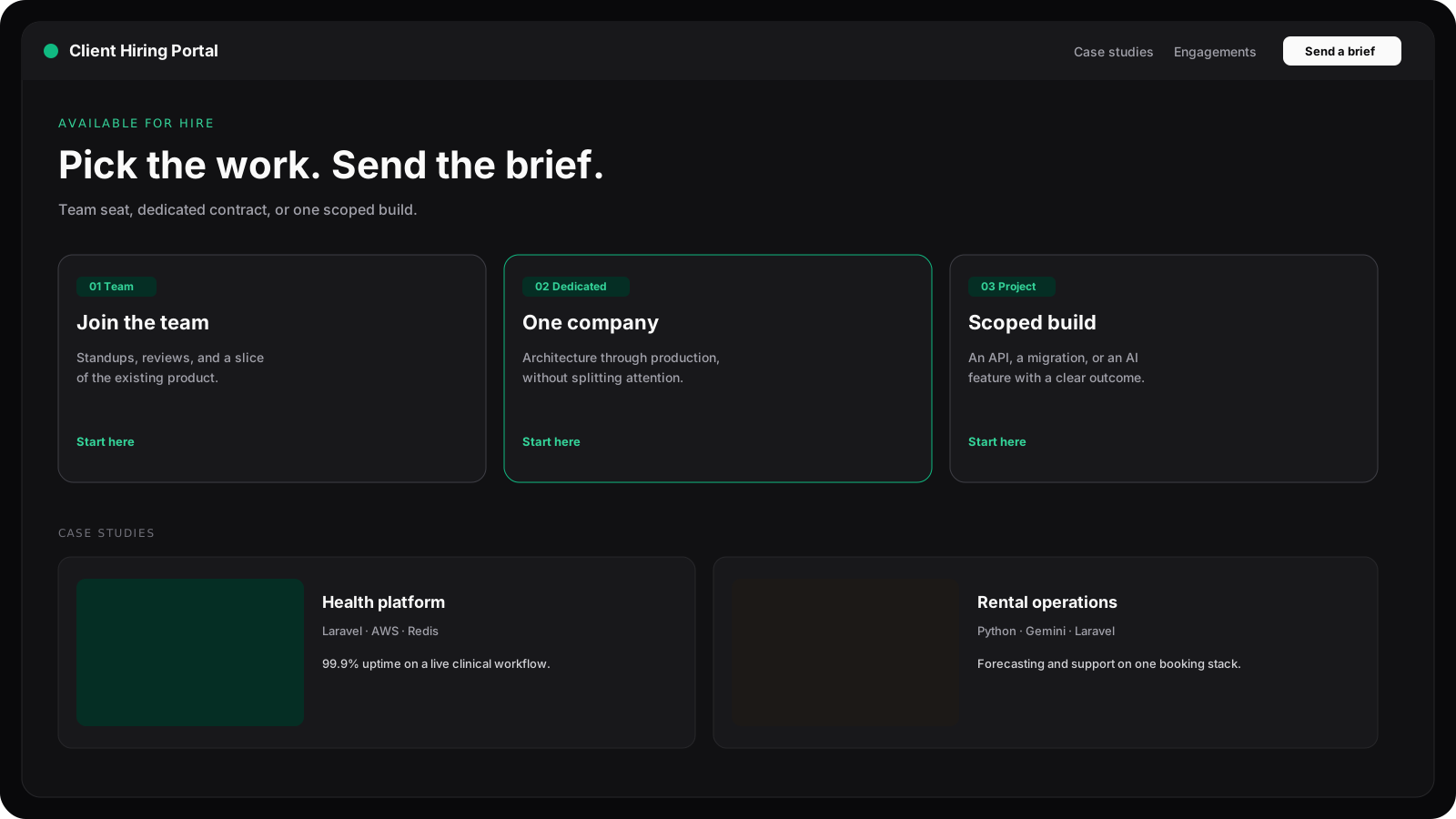
A React and TypeScript site that presents real case studies, filters work by skill, and lets a visitor choose a team role, a dedicated contract, or a scoped project.
Overview
What this is and why it matters, in plain English.
A React and TypeScript site that presents real case studies, filters work by skill, and lets a visitor choose a team role, a dedicated contract, or a scoped project.
This site: a portfolio where a company can read the work, pick how to engage, and send a brief.
The situation
What was going on before, and why it needed fixing.
Hiring managers reading a flat résumé could not tell which systems were in production, what stack sat behind them, or how to start a conversation.
Hiring managers were reading a flat résumé and still could not tell which systems were production, which stack sat behind them, or how to start a conversation.
What it needed to do
The outcomes the project had to deliver.
- Present real case studies with stack and outcomes.
- Let visitors filter work by skill.
- Offer clear engagement paths and a contact flow that does not require a PDF back-and-forth.
What I did
My part of the work and who I worked with.
Design and build end to end: React and TypeScript front end, content model, theming, motion and the contact flow, built with Vite and Bun.
How it works
The main building blocks, from the screen people use to the data underneath.
Shipped a single-page product with case-study modals, skill-to-project mapping, a timezone-aware theme, and a contact path that opens a ready brief in the mail client.
- 01
React + TypeScript
A typed content model drives the home page, case studies, services and slide decks from one data file.
- 02
Skill-to-project mapping
Skills reference project ids directly, so filters resolve reliably instead of matching tag strings.
- 03
Theme engine
Picks light or dark from the visitor’s real sunrise and sunset (estimated from their time zone, no location prompt) before first paint; a manual switch lasts until the next sunrise or sunset.
- 04
Contact path
Engagement options open a prefilled brief in the visitor’s mail client.
Key choices and trade-offs
Every build involves trade-offs. These are the important ones and what each one cost.
| Decision | Trade-off |
|---|---|
| Resolve filters by project id. | Skills need explicit links to projects, but filters never miss because of naming differences. |
| Mail-client brief instead of a form backend. | No form analytics, but no backend to run and nothing to spam. |
Under the hood
Implementation details for technical readers, with a code sample.
- No theme flash on first paint.
- Three engagement paths.
- Case studies backed by one typed data source.
function themeForVisitor(now = new Date()) {
  const hour = Number(new Intl.DateTimeFormat('en-US', {
    hour: 'numeric',
    hourCycle: 'h23',
    timeZone: Intl.DateTimeFormat().resolvedOptions().timeZone,
  }).format(now));
  return hour >= 7 && hour < 19 ? 'light' : 'dark';
}
Problems solved
What got in the way, and how each problem was fixed.
- 01
Theme had to match the visitor local day or night before the first paint, with a manual override that sticks.
An inline script decides the theme from the visitor’s timezone before React mounts, then respects a saved manual choice.
- 02
Skill names and project tags did not line up, so filters had to resolve by project id.
Skills carry relatedProjectIds, so filtering is a lookup rather than fuzzy tag matching.
- 03
Long pages needed inertial scroll that still landed section titles under a fixed nav.
Inertial scrolling with offsets that land section titles below the fixed navigation.
Security, speed and growth
How data is protected, and how the system stays fast as usage grows.
Security
A static site with no backend or stored visitor data; the contact flow hands off to the visitor’s own mail client.
Speed & growth
Vite code-splitting and lazy-loaded modals keep the initial bundle small; heavy components load only when opened.
Quality and releases
How changes were tested and shipped safely.
TypeScript checks and lint run on every build, and pages are checked visually across themes and breakpoints.
Tech stack
The tools and technologies used, for recruiters and technical reviewers.
Results
Measured outcomes recorded for this project.
| Metric | Result |
|---|---|
| First paint theme | 0 flash |
| Engagement options | 3 paths |
| Case studies | 7 live |
Questions
Plain answers first, then the detail a technical reviewer would ask about.
Common questions
- Why include a portfolio site as a project?
- It shows how I present work to non-technical readers, keep a site fast, and make it easy for someone to get in touch.
- Can you build a site like this for my business?
- Yes, especially if it needs to explain technical work clearly. Get in touch to discuss scope.
For your tech lead
- Why no contact form?
- A prefilled email brief reaches a real inbox with no backend to maintain.
- How does the theme work?
- It follows the visitor’s local day or night before first paint, and a manual choice sticks.
Key takeaways
- •This site: a portfolio where a company can read the work, pick how to engage, and send a brief.
- •Built with React, TypeScript, Tailwind CSS, Vite, Bun.